

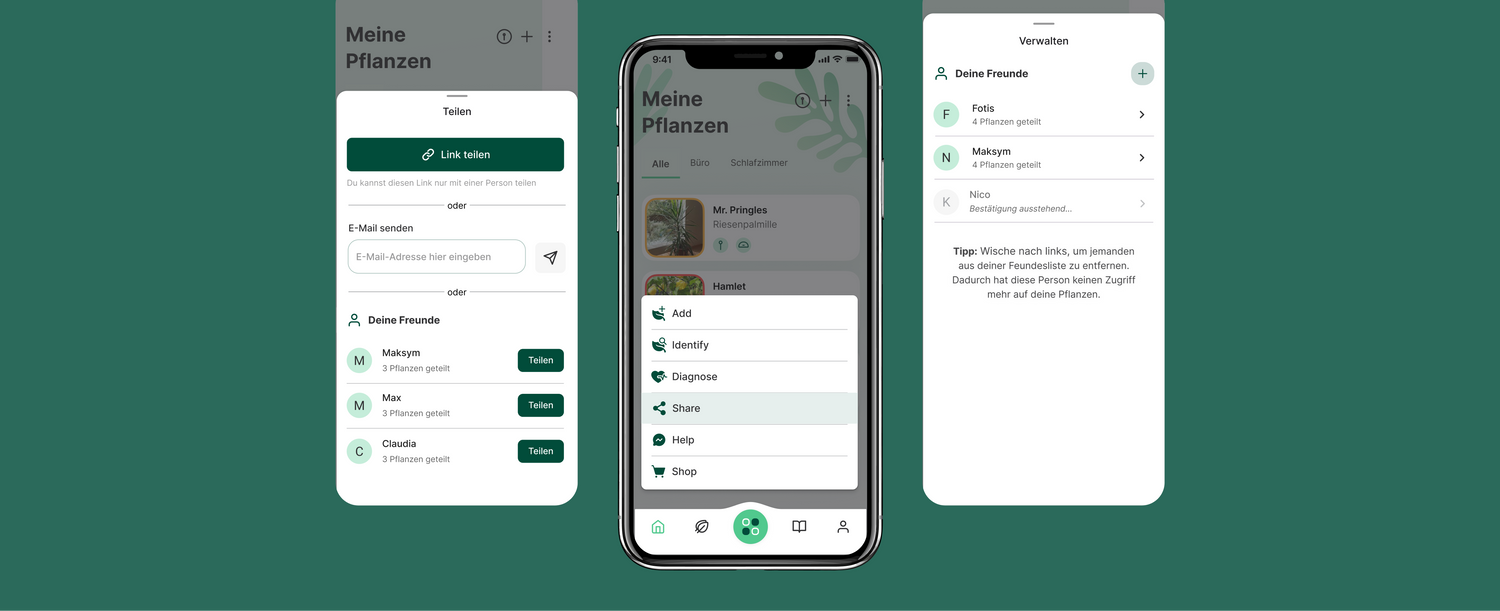
There's a new and much-requested feature in the FYTA plant care app:
With Plant Sharing, you can now share all your plant care routines with members of your household or friends who look after your plants while you're away. Here are a few things you should know about this new feature:
- To get started, simply tap the menu button and select "Share". Then follow the instructions to invite your friends by email or sharing link.
- If your friend already has the FYTA app on their phone, they will see all your plants and their information in a separate garden once they accept the invitation. If not, they'll need to download the app first.
- Your friends receive push notifications for your plants based on the notification settings in their app.
- For now, Plant Sharing is purely virtual and passive. Your friends can't edit your plants, and the FYTA Beam devices remain connected to your account only.
- Plant Sharing works best if you have a WiFi Hub. Without one, your friends can only see new plant information when you sync your Beams. But don't worry! We'll remind you twice a week to check on your plants in the real world.
- You can manage all your sharing settings in the garden screen.

Leave a comment
This site is protected by hCaptcha and the hCaptcha Privacy Policy and Terms of Service apply.